Turn any web page into a clean contact list — on your own device.
LeadHarvest pulls names, phone numbers, emails, designations, companies and addresses out of the page you are on, keeps them in local storage, and exports them as Excel, CSV, PDF, TXT or Notes. No account, no server, no telemetry.
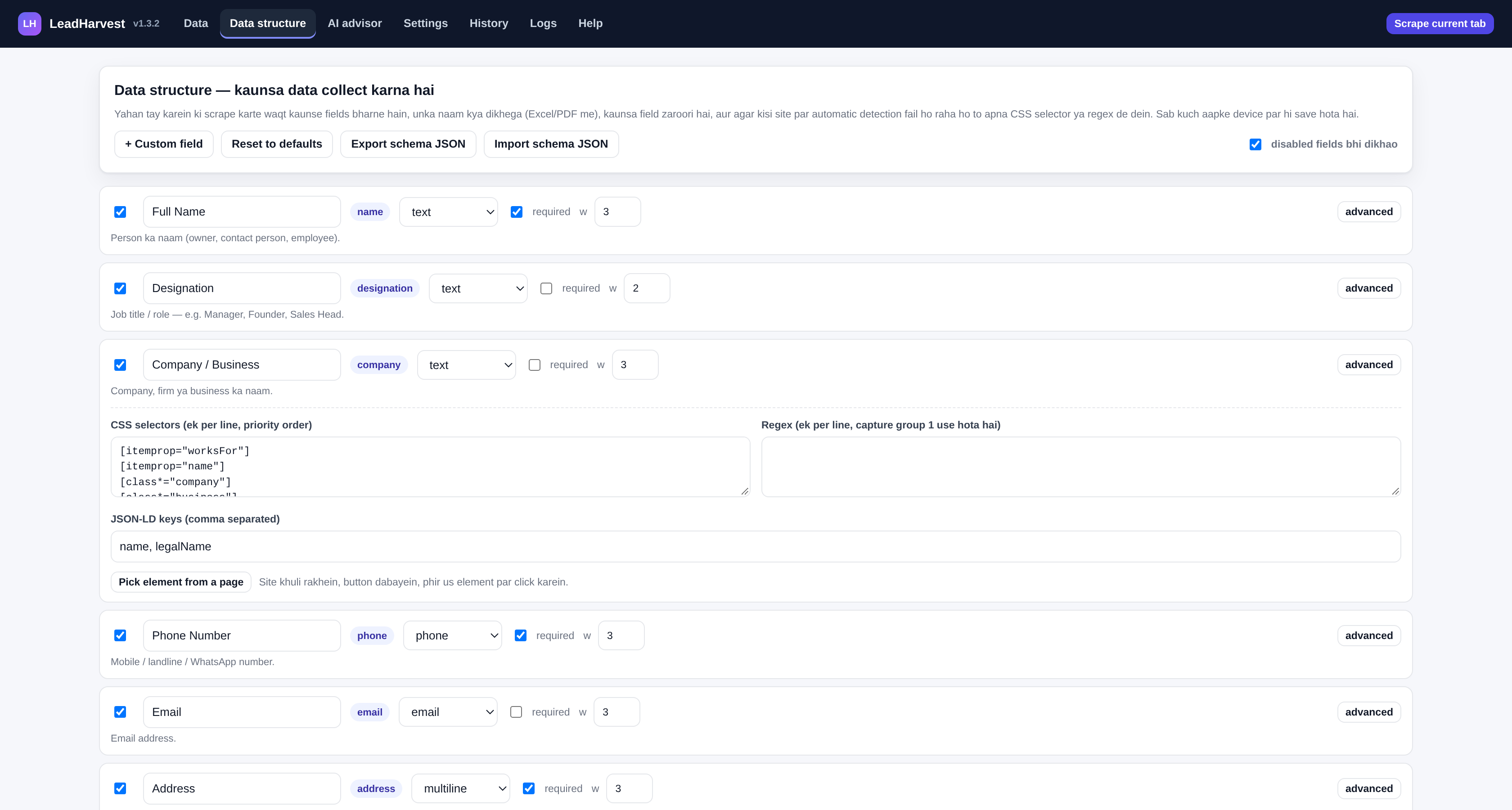
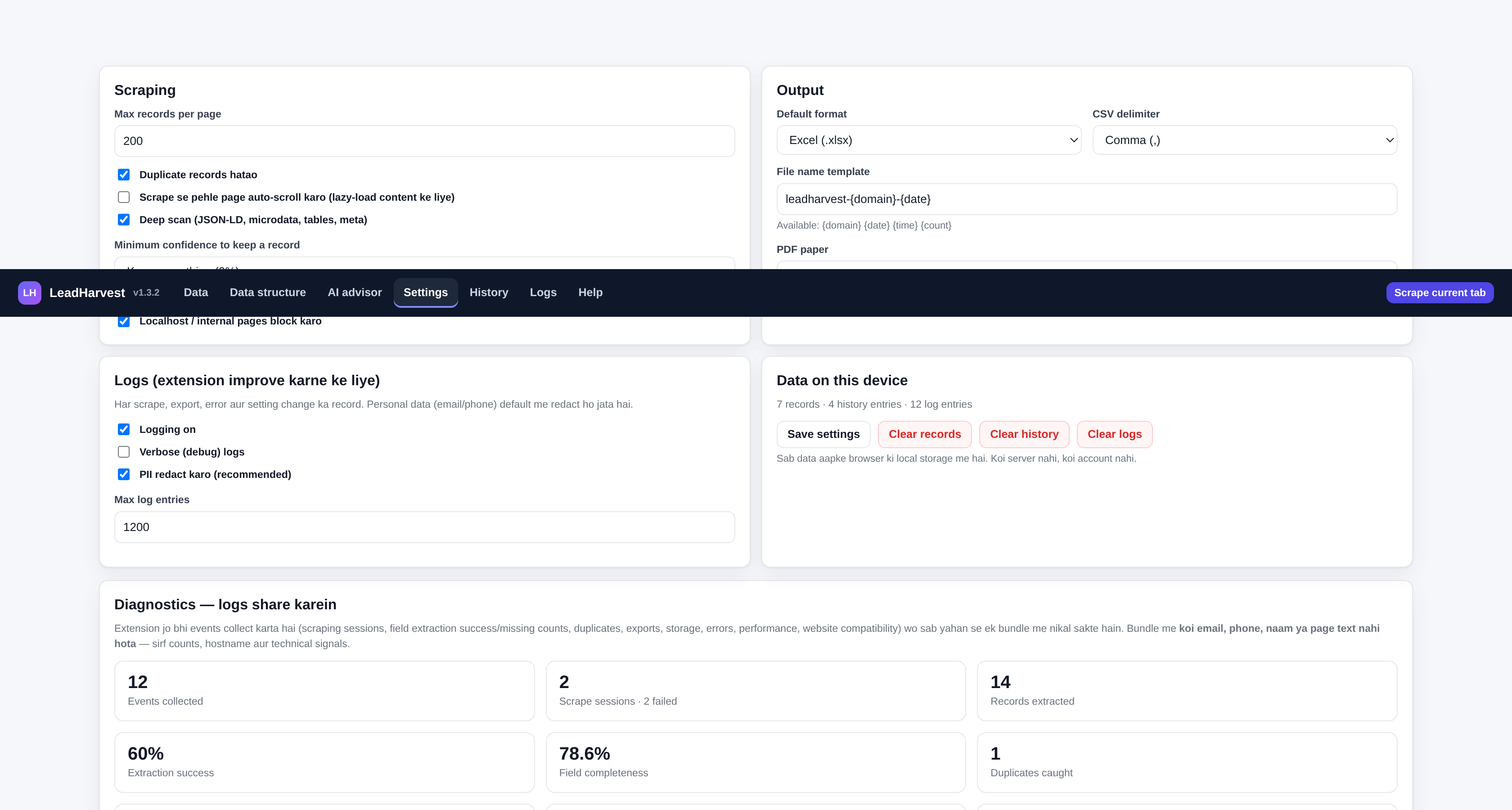
The actual interface
Rendered from the extension itself with demo data — not a design mockup. Every number, column and button below exists in the build you download.
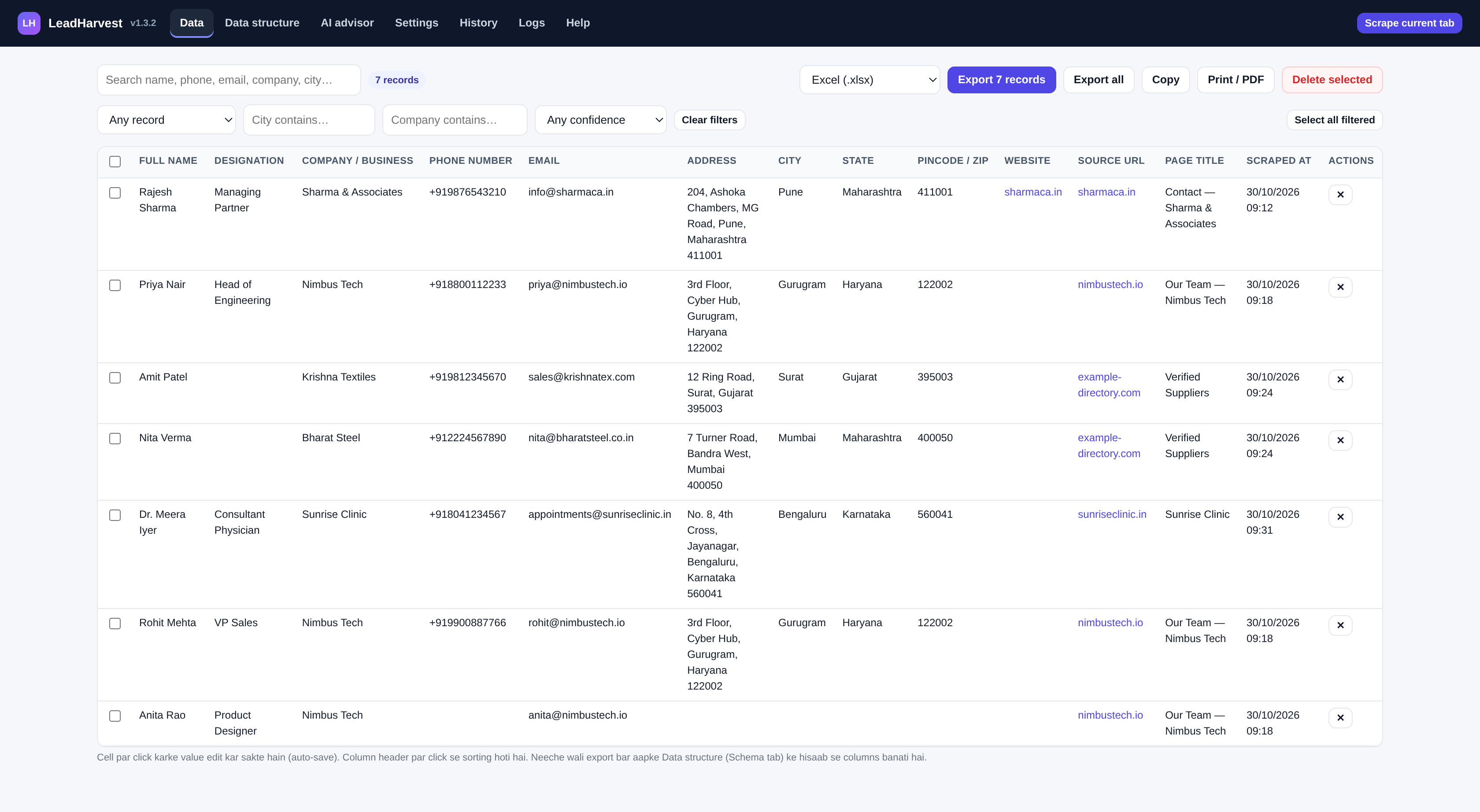
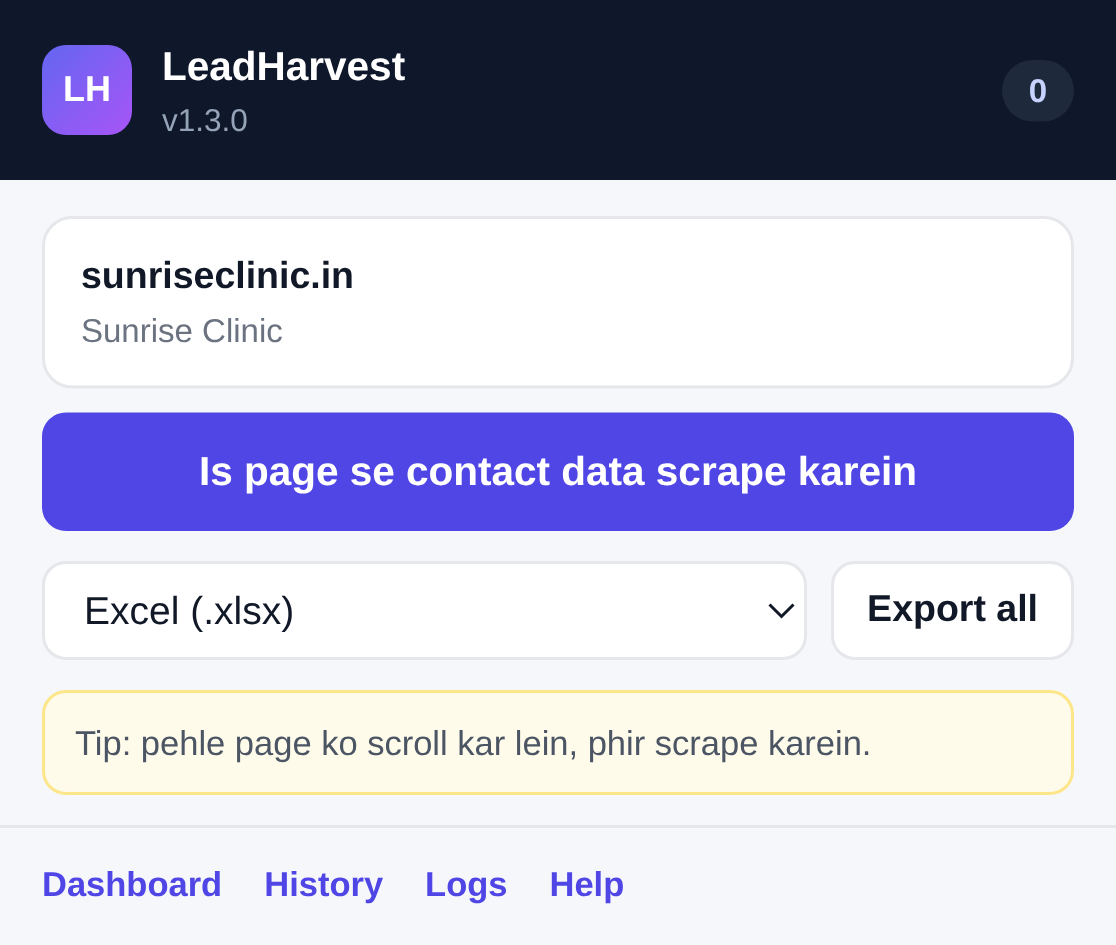
One click reads the page the way a person would
Most scrapers depend on one CSS selector, so they break the moment a site changes. LeadHarvest looks at four independent sources and keeps whichever one actually has data.
Tables
A page with a real table (Name / Phone / Email columns) becomes one record per row. Column headers are matched against a synonym list, so “Contact Person”, “Mobile No.” and “E-mail” all map correctly.
Repeated cards
Team pages, listings and directories are built from repeated blocks. The engine finds the smallest block that holds a contact signal, then reads each block as one person or business.
Single page
A contact page, profile or small business site becomes one record: the whole page is read together, and the address is split into city, state and pincode afterwards.
Structured data
If the site publishes JSON-LD or microdata (schema.org), every Person, Organization or LocalBusiness entity is read as its own record — the cleanest data a page can offer.
tel:/mailto: links → your CSS selectors → regex → heuristics.
Each value carries a confidence score, so a phone pulled from a structured telephone property outranks one guessed from raw text.
Everything in the box
Built for people who collect business contacts by hand today and would rather not paste rows into a spreadsheet one at a time.
15 fields + your own
Name, designation, company, phone, email, address, city, state, pincode, country, website, social profiles, category, rating and notes — plus any custom field you define with a selector or a regex.
Confidence scoring
Every record gets a score based on which fields were found and how reliable the source was. You can see at a glance which records are solid and which need a manual look.
Schema builder
Decide what “data” means for you: rename columns, change types, mark fields required, set weights, reorder priorities. Export the schema as JSON and reuse it on another machine.
Element picker
When automatic detection misses something, click “Pick element from a page”, then click the element on the site. The CSS selector is captured and saved to that field.
AI advisor
A local rule engine reads the page signals and recommends which fields matter here — with a reason for each. An optional cloud mode is available if you want a second opinion.
Seven export formats
Excel with frozen headers and autofilter, CSV with a UTF-8 BOM so Hindi survives, a paginated PDF, plain TXT, Markdown notes, JSON, and a print-ready HTML view.
History
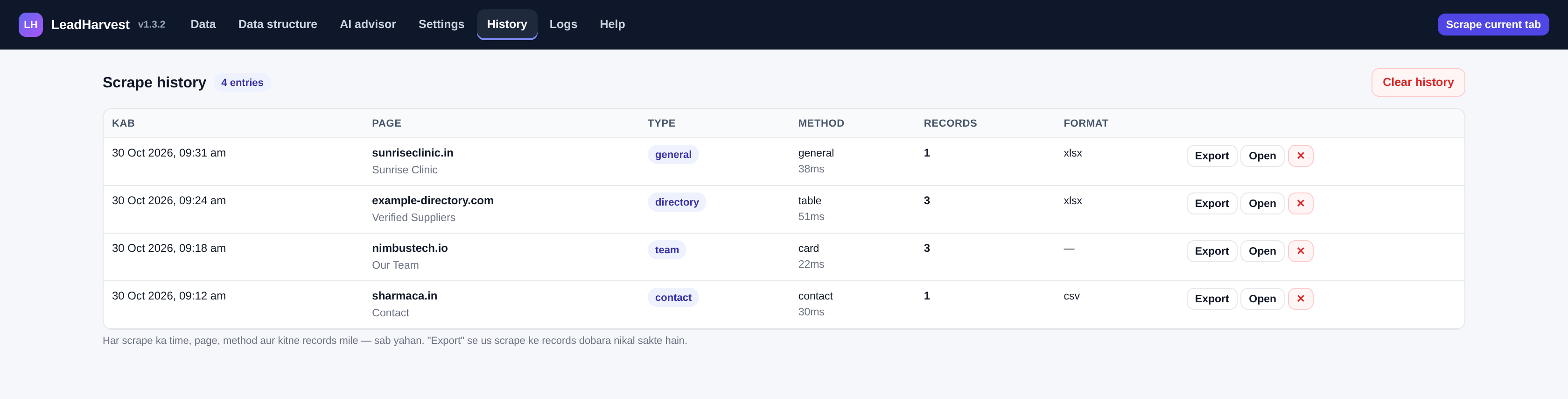
Every scrape is logged with time, page, page type, extraction method, record count and duration. Re-export the records from any past scrape in one click.
Inline editing
Click any cell in the dashboard to fix a name, add a note or paste a WhatsApp number. Edits save automatically and are included in the next export.
Logs & diagnostics
Fifteen categories of structured events — lifecycle, sessions, field extraction, quality, duplicates, compatibility, exports, storage, errors, performance and more. Counts only, never contact values.
Share logs with developer
One tap builds a diagnostic bundle and opens a pre-filled email to the developer. On phones and Windows the file is attached by the system share sheet; elsewhere it is saved and one click away.
Duplicate control
Records are de-duplicated on phone, email, name and company, both within a single scrape and across your whole library, so re-scraping a site does not double your list.
Search, filter & sort
Free-text search, then narrow by field: has email, has phone, has address, has company, city contains, company contains, or a minimum confidence. Sort any column, select all filtered, export only what matches.
Keyboard shortcut
Alt+Shift+L scrapes the page you are on without touching the mouse. Rebind it at chrome://extensions/shortcuts or about:addons.
Nothing leaves the device
No analytics, no accounts, no sync. Records live in the browser's local extension storage and disappear when you clear them or uninstall.
Every field, and where it comes from
These are the built-in fields. Each one lists the sources the engine tries, in order, before falling back to heuristics.
| Field | What it captures | Sources |
|---|---|---|
| Full Name | The person: owner, contact, employee. | Person.name in JSON-LD, [itemprop=name], [class*=person-name], headings, card titles |
| Designation | Job title or role. | jobTitle, [class*=designation|role|position], a keyword list of 97 roles (founder, manager, CA, advocate…) |
| Company / Business | Firm or business name. | Organization.name, legalName, [class*=company], og:site_name, page title suffix |
| Phone | Mobile, landline or WhatsApp number. | tel: / wa.me links, telephone, six regex families (+91, 10-digit, STD landline, international), normalised to E.164 |
| Email address. | mailto: links, email, regex with junk filtering (image names, placeholder domains, sentry noise) | |
| Address | Full postal address. | PostalAddress joined into one line, [itemprop=address], [class*=address|location|office], pincode-based detection |
| City | City or locality. | addressLocality, parsed out of the address using comma structure and pincode position |
| State | State or region. | addressRegion, matched against a list of 39 Indian states and union territories |
| Pincode / ZIP | 6-digit PIN or 5-digit ZIP. | postalCode, regex over the address |
| Country | Country. | addressCountry, “India” detection in the address text |
| Website | Business site or profile URL. | url in JSON-LD, link[rel=canonical], page origin |
| Social / LinkedIn | LinkedIn, Instagram, Facebook, X, YouTube, Telegram. | sameAs, outbound links filtered by domain |
| Category / Industry | Business type. | schema.org @type, [class*=category|industry], meta section |
| Rating / Reviews | Star rating and review count. | ratingValue, reviewCount, [class*=rating] |
| Notes | Your own remarks. | You — type into the dashboard cell |
| Custom field | Anything else: GST number, WhatsApp, employee count… | Your CSS selector, your regex, or a JSON-LD key |
| Source URL | Which page the record came from. | Automatic |
| Page title | Title of that page. | Automatic |
| Scraped at | Timestamp. | Automatic |
Phone numbers are normalised: 98765 43210, 098765 43210, +91-98765-43210 and (+91) 98765 43210 all become +919876543210. Landlines keep their STD code.
You decide what a record looks like
The schema tab is where the extension stops being generic. Turn fields off that you never use, rename the ones you do, and teach it the ones it does not know.
Per field you can set
- On / off — only enabled fields are scraped and exported
- Label — the column header in Excel, PDF and CSV
- Type — text, phone, email, URL, multiline or number
- Required — flags records that are missing a must-have
- Weight — how much the field counts towards confidence
- Selectors — one CSS selector per line, tried in order
- Regex — one pattern per line, capture group 1 is used
- JSON-LD keys — comma separated property names
Presets, import and export
Four ready-made structures, one click each:
- Phone book — name, phone, address, city, state, pincode
- B2B leads — name, designation, company, email, phone, website, city
- Directory / listing — company, phone, email, address, city, category, rating
- Everything — all fifteen fields on
Export the whole schema as leadharvest-schema.json and import it on another machine, or keep it in version control next to your team's conventions.
“Which data is actually worth scraping here?”
The advisor looks at what the page offers — structured data, tel: links, tables, forms, address text, page type — and tells you which fields to enable, with a reason for each suggestion.
Local rules default
- Runs entirely inside your browser
- No API key, no account, no cost
- Deterministic: same page, same advice
- Explains itself in plain language
- Works offline
Cloud AI optional
- Bring your own key: Sarvam AI, OpenAI, Groq or any OpenAI-compatible endpoint
- Only a short page summary is sent — never the full HTML
- Off by default; nothing is sent until you enable it
- Your key is stored locally and sent only to the provider you chose
Get the data where you actually need it
Files are written by the extension itself — no external library, no upload, no conversion service. They land in your Downloads folder.
| Format | File | Best for |
|---|---|---|
| Excel | .xlsx | Sorting and filtering. Frozen header row, autofilter, wrapped cells, sensible column widths. Imports cleanly into most CRMs. |
| CSV | .csv | Google Sheets, Zoho, HubSpot, any importer. UTF-8 BOM so Hindi and accented names are not mangled. Comma, semicolon or tab. |
.pdf | Sending a list to a client or printing it. A4 or Letter, paginated, with a header and page numbers. | |
| TXT | .txt | Reading on a phone, pasting into WhatsApp or a chat. |
| Notes | .md | Notion, Obsidian, Google Keep, Apple Notes — one heading per record, bold labels. |
| JSON | .json | Feeding your own scripts or a database. |
| HTML | .html | Open in a browser and print to PDF — the reliable route for Devanagari and other non-Latin scripts. |
| Clipboard | — | Tab-separated, pastes straight into a spreadsheet. |
File names come from a template you control: {domain}, {date}, {time}, {count}. The default produces something like leadharvest-sharmaca.in-2026-10-30.xlsx.
Your list lives on your machine
Records, history and logs are kept in the browser's extension storage. Nothing is uploaded, and there is no account to log into.
Records
Up to 5,000 records with all their fields, confidence scores and source URLs. Search, filter, sort, edit, delete, export — all local. A confidence threshold in Settings keeps weak records out of the list in the first place.
History
The last 500 scrapes: when, from which page, which method was used, how many records, how long it took, which format you exported.
Logs
Scrape, export, settings and error events with levels and scopes. Emails and phone numbers are redacted before they are written.
Diagnostics — and sharing them
Settings → Diagnostics shows what the extension has actually recorded: sessions, extraction success rate, field completeness, duplicates caught, exports, errors, average timing, and a per-site breakdown. Nine live counters, plus a capability report that states plainly which checks this build does and does not perform.
“Share logs with developer” builds a bundle and opens a pre-filled email to br19shc39@gmail.com. You can add a note about what went wrong. The bundle contains counts, hostnames, timings and technical signals — no email address, phone number, contact name or page text. Nothing is sent until you press the button, and the email goes out through your own mail client, not through us.
Two minutes, either browser
Chrome, Edge, Brave, Opera
- Download and unzip the extension folder.
- Open
chrome://extensions(oredge://extensions). - Turn on Developer mode.
- Click Load unpacked and pick the unzipped folder — the one containing
manifest.json. - Pin the LeadHarvest icon to the toolbar.
- Optional:
Alt+Shift+Lscrapes the current page from anywhere.
Firefox 140+
- Open
about:debugging#/runtime/this-firefox. - Click Load Temporary Add-on.
- Select
manifest.jsoninside the unzipped folder. - The add-on is active until you restart Firefox — permanent installs come from a signed build on addons.mozilla.org.
Straight answers
Does it send my data anywhere?
No. Scraping, parsing, storage and file generation all happen inside your browser. The only network request the code can make is the optional cloud-AI advisor, which stays disabled unless you add your own API key and switch it on.
Why does it need access to all websites?
Because you point it at whatever page you are reading, and that could be any site. The extractor is not injected into pages automatically — the manifest declares no content scripts, and the code is injected only at the moment you click scrape. If you prefer, you can restrict the extension's site access in your browser's extension settings.
Is this legal to use?
Scraping publicly visible pages is widely done, but the rules depend on the site and the jurisdiction. Check the site's terms of service and robots.txt, collect only what you actually need, and remember that contact details are personal data — in India the DPDP Act 2023 gives people rights over it, including deletion. The extension is a tool; how you use it is your call.
What does it deliberately not do?
No crawling across many pages on its own, no logging into sites, no bypassing paywalls or captchas, no bulk email or WhatsApp sending, and no uploading to a cloud of ours. It reads one page you are looking at, when you ask it to.
Why did a page return zero records?
Usually one of three things: the page loads its content on scroll (turn on “auto-scroll before scraping”, or scroll manually first), the contact details are inside an image, or the site hides them behind a form. Opening the individual detail or contact page and scraping that usually works.
Excel shows the phone number as a number and drops the plus sign.
Phone numbers and pincodes are exported as text on purpose, so leading zeros survive. If your spreadsheet app still reformats them, set that column to “Text” before importing.
Hindi or Tamil text turns into question marks in the PDF.
The built-in PDF writer uses the standard PDF fonts, which only cover Latin script. For Indic scripts, export as HTML and print to PDF from the browser, or use the “Print / PDF” button — the browser has the right fonts.
How do updates work?
Install from addons.mozilla.org and Firefox keeps the add-on up to date by itself — no setting to change. For self-hosted installs the package carries an update_url that points at a published update manifest, and Firefox checks it once a day.
How do I report a bug?
Open the dashboard → Settings → Diagnostics, type one line about what went wrong (which site, which field), and press Share logs with developer. A bundle is generated and your mail client opens pre-filled to br19shc39@gmail.com. The bundle has counts and hostnames only — never the contacts you scraped.
Can I use it for my team?
Yes, but there is no sync: each browser keeps its own local list. Share the exported Excel file, or share a schema JSON so everyone collects the same fields.
Who builds this
LeadHarvest is an independent project — a small, dependency-free extension written to solve one problem well: getting contact details off a web page without handing them to a third party.
Amit
Developer & maintainer
I build small tools that keep data on the device it came from. If you find a site where LeadHarvest misses a field, send me the URL and I will add a selector preset for it.
- Instagram @osintgram_io
- Email br19shc39@gmail.com
- Privacy Privacy policy
- Source GitHub repository
Mail br19shc39@gmail.com with the page URL, your browser version and — if you can — the diagnostics file from Settings. That bundle usually explains the failure in one look.
No account, no analytics, no server. Records stay in your browser. The only optional network call is the cloud AI advisor, which you enable yourself.
Read the full privacy policy →